Showing posts with label drawing. Show all posts

Saturday, September 16, 2023

Drawing Backgrounds in Clip Studio Paint - Freehand Method Over a Perspective Grid


Drawing Backgrounds in Clip Studio Paint - Freehand Method Over a Perspective Grid

Hello Fellow Artists!

I just wanted to share another video with you that I created.  In this one I show my process for starting with a very loose sketch and cleaning up the work with minimal use of the perspective guides.

Don’t get me wrong, I still use the perspective tools here and there as well as the straight line tool but by drawing as much freehand as possible we tend to get a more interesting and organic look.

I picked this concept up from the amazing talented David Finch.  He does his version with pencil and paper but then I started to emulate it with digital methods.  Clip Studio is my weapon of choice today but I also like to use Procreate as well.

So here is the breakdown of the drawing process -

1. Draw a rough sketch.  It’s good to have a concept first but some people like to drawn the perspective guides first. Try both ways to see what fits for you.

2. Drawn a perspective grid through the design on a new layer using the perspective ruler.  I personally like to add more lines where I need them and less where I don’t.  Another cool technique you can try here is making the lines different colors for each direction.  This is insanely easy in Clip Studio since you have layers to work with.

3. Now you can start inking and cleaning up the work.  I like to tighten up the work as I go rather than redraw it all again.  This takes practice but it can be a bit faster and help us to avoid over thinking all the details.  I’m a chronic over thinker.  Plus, since we are working digitally there are lots of ways to correct things as we go.  

4. Try drawing just a couple of thin lines in perspective but then draw over them and through them as you render your scene.  Too many straight lines can make everything look too clean.  This is a style choice but for this example I want a building that looks older and more weathered. 

I also feel like this approach lends to creative thinking since you are making decisions on the go and using the rough sketch as a blueprint.  Rough concepts are where the ideas and energy come from.  We tend to lose some of that as we over refine the work.

5. Just continue to clean things up but also keep adding imperfections along the way.  It really helps to tie it all together. I like to use black and white and flip between them by hitting “X” on the keyboard.  It’s like having unlimited whiteout as I ink.  You can always change the layer mode to “Multiply” later to color beneath it all.

You can watch the video here and see it all in real time with me blabbing on about my process of course! ;)


If you have any questions or requests for new video tutorials you can reach me through my website at https://www.ramstudioscomics.com on my contact page.

I also have some perspective tutorials on my main website like this one - Perspective Drawing Techniques - How to Mirror and Map Distance

More videos are on the way and thank you for viewing.  I am working on a cleaner line art version to show the comparison.  I know styles vary greatly and I enjoy experimenting anyways.  So more on the one soon.

I hope you found some value here!

-Robert


Wednesday, November 22, 2017

Testing the Clip Studio Paint App for the iPad Pro


Clip Studio Pro App for the iPad


Here is a quick demo of the inking and coloring from the Clip Studio Paint app on the iPad Pro. I must say it functions just as it should. ( so far! ) Everything is extremely similar to the desktop version. Probably the most difficult thing to figure out was the import/export of the files. ( Quick note - if you are running Manga Studio 5 EX you can open your files on the iPad but not from the Clip Studio Version back to MS5. Just use PSD's until you get the updated software for your desktop as a work around. )

Really nice to be able to sit back on the couch and work on any of my fully layered MS5 files. Will definitely help with the Blackstone comic. That alone will justify the monthly costs I guess but still not happy with it. I just feel too many of these companies are trying to justify monthly memberships. I don't want to get on a negative tangent about that but I think they should do a one time purchase where you would either pay for major updates or a monthly subscription where all updates and support is included. Just my 2 cents of course!

I will keep testing this app out and let you know what I find and videos will be on the way. I must admit I am pretty impressed with its ability to run like a full blown program on the iPad Pro. I imagine others such as Photoshop will follow soon. I will also say that Procreate does handle the sketching process a bit better in my opinion but it is still a bit early to be sure about that. The inking and watercolor brushes on Clip Studio Paint are just as amazing as they are on the desktop version so that is pretty freaking cool!

Have a Happy Thanksgiving!! 

Good luck with your art and more on the way! ;)

Robert A. Marzullo
Ram Studios Comics

Want to learn how to draw and paint using Manga Studio 5 ( Clip Studio Paint )


Wednesday, July 19, 2017

Learn to Draw and Paint an Ogre Concept in Manga Studio 5 / Clip Studio Paint

Learn to Draw and Paint an Ogre Concept in Manga Studio 5 / Clip Studio Paint

_____________________________________________________________________________


Welcome back everyone! I have some new course content to share with you today. It is on drawing and painting an Ogre character concept in Manga Studio 5 / Clip Studio Paint. In this course I will walk you through the entire process step by step while explaining the tools I use within this program.


Drawing and Refining the Concept


We will first start with the rough sketch where you will learn how to define the overall proportions of this creature design. You will learn a series of techniques to adjust and add to the existing line work to get the desired look of the character. Then I will show you how to clean up the line work and get it ready for the digital painting process.

Adding in the Flats and Separating the Work


In the next lessons we will go over how to add in the flat colors while segmenting the work. This will help us visualize the direction we are heading and aid in the painting process later on. Segmenting the work on complex characters or scenes can help you to retain a solid feel to the artwork until you build the confidence to no longer need these steps. Some artists use this method on every piece of artwork they create and others begin to use less and less layers over time as their skills with editing become more effective.  It is for you to decide what works best in your workflow.


After we have put all the foundational information in place we will begin to add in our digital painting effects. We will be using some custom brushes but not many. I have puposely created this artwork with a minimal set of brushes to show you that it can be done effectively with just a few good brushes. Amazing paintings can be done with just one brush but you will spend more time creating the effects you might be looking for. All the brushes I have used will be included with this course.

_____________________________________________________________________________

This course consists of 19 step by step narrated lessons showing you how to draw and paint this character design. You get the art files and custom brushes to work along with. The total course is 
4 Hours 29 Minutes long.
_____________________________________________________________________________

So I am excited to know what you think and if you decide to take this course I hope you gain a lot of valuable techniques for your workflow. I am here if you have any questions!

You can get this entire Course on my Gumroad here - https://gum.co/lYFX

Robert A. Marzullo
Ram Studios Comics


Wednesday, April 5, 2017

Drawing Comic Style Art - Wacom Intuos Tablet - Narrated


In this video I am using a Wacom Intuos 4 Tablet to pencil, ink, and color this Hulk FanArt. I talk about the benefits of using this type of device compared to the more expensive units such as the Cintiq and iPad Pro. You can accomplish everything you want with the more affordable devices with practice and patience. 

This artwork is created with Manga Studio 5 / Clip Studio Paint which also works very well with this type of device. I have more videos on the use of that program on my channel as well! ;)

Get your own Wacom tablet here with my Amazon Affiliate Link - 

Follow me on Gumroad for more Video Lessons and Custom Brushes http://www.gumroad.com/robertmarzullo

I now have a Artist Mentorship program on my Patreon!

Robert A. Marzullo
Ram Studios Comics

Monday, March 27, 2017

My Review of the FlexiSpot M2 35" Sit/Stand Desktop


My Review of the FlexiSpot M2 35" Sit/Stand Desktop


I am currently reviewing the FlexiSpot M2 35" Sit/Stand Desktop. It is an amazing product for people that are at their workstations for long hours. As artists and designers we find ourselves in this situation a lot.

I have been known to draw for 14 hours on some days when deadlines are looming and a setup like this can be a lifesaver. Whenever my lower back would start to hurt I would have to stop and walk around for a while before I could get back to drawing but now with this setup I can simply adjust it to stand up and alleviate my back pain. The health benefits to a product like this one are huge and the productivity is amazing as well because you stay in the moment of creating longer.

It has a huge range of lift to the unit and the real benefit is that it lifts everything together in one motion and it is completely stable so that you can draw and work without the distraction of your devices moving.

They also gave ample room to the work area and the keyboard tray to house multiple devices like you see here. I have my Mac keyboard, mouse, and Intuos 4 with room to spare. They even incorporated a slot for your phone or iPad to sit. Kudos! ;)

This is the FlexiSpot M2 35" Sit/Stand Desktop. They have larger and smaller unit to suit your needs. They are built well and there is only a small amount of assembly that took me about 15 minutes to complete. I give this product a 5 star review from my perspective as an artist/designer.

If you are interested in this device you can get yours here - 


I am here if you have any questions about this product and good luck with your art!

Robert A. Marzullo
Ram Studios Comics
www.ramstudioscomics.com


Thursday, March 2, 2017

Drawing Castlevania Game Art in Sketchbook Pro 8 - Narrated Video


In this video I use Sketchbook Pro 8 to draw fan art for our last Youtube contest winner. This is Simon Belmont and Dracula from the Castlevania game. I created this one with a comic art style. Next I will be adding the inks and colors so please stop back to see the finished product if you like!

Robert A. Marzullo
Ram Studios Comics
www.gumroad.com/robertmarzullo

I used a Wacom Cintiq 22 HD to draw this. You can get the same
device here on Amazon - http://amzn.to/2lEOKZq

Friday, February 17, 2017

Digital Panting in Manga Studio 5 - Working in Perspective


Digital Panting in Manga Studio 5 - Working in Perspective 

In this course I walk you through using the perspective tools inside of Manga Studio 5 / Clip Studio Paint. We first delve into the basics and the setup in one, two, and three point perspective. Then I walk you through the use of the  special rulers. A lot of students have expressed a certain confusion about these tools but the reason they are difficult to understand is because they have lots of options for controlling the perspective. 
I demonstrate these tools and show you how to make them much easier to work with. A few programs have now adopted perspective drawing tools but none of them are as functional and versatile as these are. The special rulers alone are huge time savers for comic book illustrators.
After I run through the basics I think take you through the entire process of creating the image you see above. ( Scroll to the next slide to see the entire picture. ) The majority of this course is all in real time with only small amounts time lapsed in areas where I have already explained the process in real time and didn't want to bore you with repetition. 
I also teach you how to setup and edit your work efficiently by making proper use of the groups and layers. As well as give you a better understanding of the blending modes.
By the end of this 5 hour course you will have worked through the entire image with me and learned what techniques I use to create my digital paintings.
With this course you get -
-19 Step by Step Video Lessons ( 5 hours of Narrated Content )
-City Scape Art File - Manga Studio 5 Format ( You can also request a PSD )
-Custom brushes that I used in this course 
Like any other products you get from me on my Gumroad I am here to help you with any questions you have. I appreciate your support so don't hesitate to ask, and giving me feedback for future lessons is greatly appreciated!

Get this course here - https://gum.co/KfBEj

Good luck with your art!
Robert A. Marzullo
Ram Studios Comics
www.ramstudioscomics.com


Monday, January 30, 2017

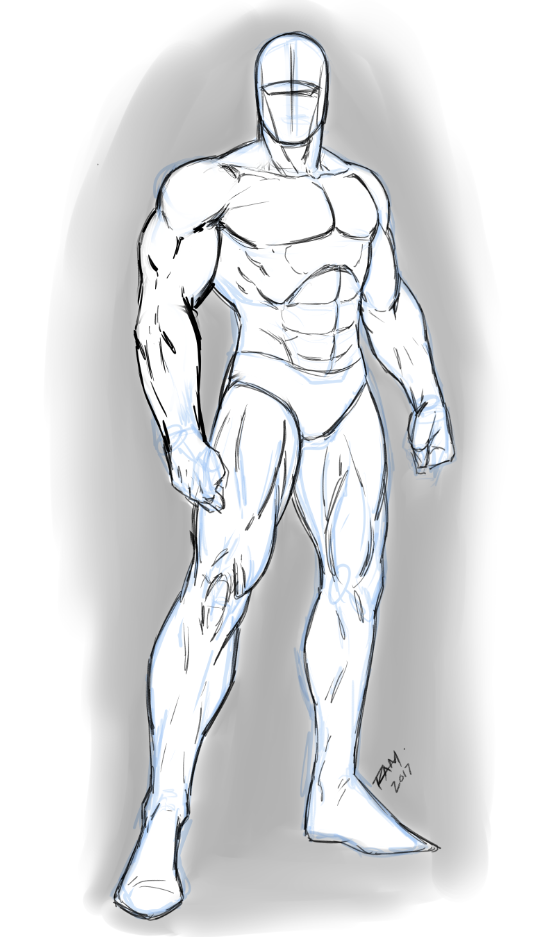
Comic Book Heroes Pose Pack - RAM

Comic Book Heroes Pose Pack


I started my first Comic Book Heroes Pose pack on my Gumroad. These will consist of all of my favorite poses that I have developed over the years and a bunch of new ideas that I am working out. There will be action poses such as fighting, lifting objects, throwing, kicking, power poses and so on. There will also be a lot of the overlooked stuff like basic social interactions. Even things like sitting around drinking a cup of coffee. You need all sorts of poses to tell a well rounded story. ( You are also welcome to make requests on a pose you would like to see. ) This is just the start of this pose pack so get it early and get access to all of these as they are created and uploaded. The price will increase when the pack gets larger but for now you can get your copy at the bargain price of $3. You will get all the future updates included if you purchase now. The other benefit to this pose pack is that they will be organized for easy access. So if you find yourself in a pinch when constructing that next panel of art you can quickly reference this pack. These will be in a mannequin style drawing so that you are not hindered in your own creative process. I will include some anatomy shots but they are merely for you to study. This is not meant to replace your own drawing process but act as an aid to it. You can still jump on my Ram Studios Comics newsletter and you will get lots of free poses to work along with but they will be more gesture and style based than this pose pack will be. Join the newsletter here - http://www.ramstudioscomics.com If you want to try it out here is my Gumroad link - https://gum.co/UJaJe As always, thank you for your support and good luck with your art! :) Robert A. Marzullo Ram Studios Comics


Monday, January 16, 2017

Comic Book Poses - My Sketches and Studies


Comic Book Poses by RAM


Working on some more comic book poses. I am going to compile them into a set on my Gumroad but I will be sharing some of them as a monthly newsletter. So if you are like me and you would love to have lots of various poses to work from head over to -

http://www.ramstudioscomics.com - and sign up for the list.

I will be doing all sorts of pose studies. Everything from couples sitting there having some coffee to hulking behemoths busting through walls.

This should be a great resource for all types of artist that need figure drawing but it will be primarily focused on comic book heroes. Male and female poses. 

It should also be a nice addition to my course content so if you decide to take those you will also get a copy of the PDF's.

Good luck with your art and more on the way real soon!

Robert A. Marcello
Ram Studios Comics

#drawing #comics #poses #figuredrawing #reference #studies #sketches #superheroes #pose #comicstyle #artwork

Saturday, November 19, 2016

Illustrating the Leg Anatomy - Step by Step Study

Illustrating the Leg Anatomy - Step by Step Study 


In this video I illustrate the leg anatomy step by step. I show where the muscles are on the front and back of the legs. If you like this type of video please comment below and share this so that I can do more.

You can support my work by becoming a Patron of mine and you will get the high resolution art files from studies I create -

You can get my Custom Brushes and Video Lessons on my Gumroad -

Thank you for watching and more on the way real soon!

Robert A. Marzullo
Ram Studios Comics

Monday, November 7, 2016

How to Create A Split Screen or Active Mirrored Window in Clip Studio Paint


http://www.gumroad.com/robertmarzullo - To get my Custom Brushes for Clip Studio Paint and Manga Studio 5.  In this video I explain how to create an interactive split screen or mirror window of your active work space in Clip Studio Paint. This is a great feature to help with recognizing flaws in your drawing and paintings while you create. It can be a huge time saver!

If you find this video helpful then please like and share it so that I can bring you new content each and every week. And be sure to Subscribe!

You can also support my work on my Patreon and get access to exclusive art files and video lessons each month per your requests-


Thursday, October 27, 2016

How to Draw Eyes - Male Vs Female - Step by Step


In this video I talk to you about how to draw eyes for both your male and female characters.
I show you a few of my techniques for sketching and refining the eye shapes. How to spot flaws in the symmetry and fix them and so on.  This lesson was in response to a request so be sure to let me know what video topics you would like to see covered in the future. 

I upload at least 2 to 3 times a week so be sure to subscribe to get notified about new videos as they are released.  I will be bringing my Live Streams back to Youtube as I wasn't too impressed with Twitch's platform. It seemed very glitchy and I think it better for gamers than art videos. IMO.
I believe it will be better to keep all my uploads on Youtube for now and sharing some premium content through my Patreon.

In this video I am using Sketchbook Pro 8 and a Wacom Cintiq to draw with.  I don't talk at all about the program in this one because I want it to be helpful for traditional artists as well.

Thanks for stopping by and good luck with your art! :)

Robert A. Marzullo
Ram Studios Comics

Follow me on Gumroad for Custom Brushes and Video Tutorials -

Support my work on Patreon and get High Resolution Art Files and Videos exclusively for my Supporters -

#drawing #comics #howtodraw #eyes #video #art #artwork #lesson #learntodraw


Saturday, October 22, 2016

My New Gumroad Page - Update - Brushes and Templates


New Gumroad Page - http://www.gumroad.com/ramstudioscomics

Quick update for everyone who might visit my Gumroad page.  I had to create a secondary page for my FREE products.  A few of these were getting downloaded so much my bill was increasing and I really can't afford it right now.  But this may work out better for everyone.  I can keep creating free items and sharing my content while still gaining tips or Pay What You Want type contributions.

So just to clarify - If you don't want to pay anything you simply hit 0 during the checkout process.  The + is jut there for people that want to help me keep making new content.  That is it!  Right now you can get my comic page template, my Procreate Brushes, my Basic Photoshop Paint Set, and my PS Patterns download.  There are more things I am working on now and you are always welcome to contribute ideas on what you would like to see in the future.

Keep in mind that my paid Gumroad is still in place for my students and supporters at
http://www.gumroad.com/robertmarzullo

I also lowered the price on some of the lessons to hopefully make it more accessible for everyone.

Thank you for taking the time to read this update and good luck with your art!

Robert A. Marzullo
Ram Studios Comics


Wednesday, October 12, 2016

How to Make Money with Your Digital Art - 5 Ways


How to Make Money with Your Digital Art - 5 Ways


I was recently asked how I make money with my art. This can be a tricky topic and a 
lot of people tip toe around this subject. And although my methods that I share here may or may not work for your particular art and life style, this will at least shed some light on what I do to generate income with my Digital Art.

If you know any artists that may be facing this dilemma then please share the post. In this video I cover my  5 ways to make money with your digital art. I also talk about the other pros and cons to some of these areas of work.

I hope you enjoy this video and find it informative. Thanks for watching and good luck with your art 
endeavors!

Robert A. Marzullo
Ram Studios Comics

Follow me on Gumroad for my Video Art Tutorials and Custom Brushes -

Become a Patron of my work and get access to Bonus Content like High Resolution Art Files
and Patreon Only Videos -


Monday, October 10, 2016

Creating Comics on the Ipad Pro with Procreate


Get my Custom Procreate Brushes that were used in this video here -
http://www.gumroad.com/ramstudioscomics

This device is fully capable of creating fully finished comic art when using the program Procreate.  Not only does the software fun amazing fast, it is loaded with great features including perspective rulers, automatic video recording in 4K, one of the best brush engines I have seen ( and I have seen them all...mostly. ) and no lag even while working with large file sizes.  I don't claim that this will replace the desktop but it is getting really close and it surpasses it when it comes to mobility. Obviously. lol

Good luck with your art and more on the way real soon! ;)

Robert A. Marzullo
Ram Studios Comics

Support my work on Patreon and get special rewards such as a Patreon only video once per month and access to my art files in HD.
http://www.patreon.com/robertmarzullo

Saturday, October 1, 2016

Drawing Superhero Women - Various Poses - Comic Style


Here are some more poses to study.  This is one of my favorite things to practice.  I always learn from drawing various body poses from either other artists or from life and giving it my own spin.  I think this is one of the fastest ways to grow your knowledge and perspective as an artist.  It helps to draw a variety of these so that you don't just jump right to the same static poses you have drawn over and over again.  Plus, the female body is so tough to get right in my opinion.  Very easy to get proportions wrong and make things look overly robotic.  As you can see with these poses I still have a ways to go but we all do.  I think no matter where you are in your figure drawing, you can still improve.  And if you don't see that in your work, then the game is over.

So I hope you enjoy these poses and I will share more along the way as I create them.  Good luck with your own studies and enjoy your journey! ;)

Robert A. Marzullo
Ram Studios Comics

Follow me on Gumroad for Video Tutorials and Custom Brushes - 

Become a Support of my work on my Patreon and get Bonus Content and High Resolution Art Files -


Tuesday, September 20, 2016

Monster teeth - Step by Step - Drawing and Coloring


Here is another step by step Youtube Video. No commentary on this one, just drawing.  I will have to release quick ones like these when my deadlines get tough so I hope everyone understands. At least this way I can still keep sharing content along the way. This one is just me drawing and coloring some crazy monster teeth.  Because you never know when you might get asked to draw some crazy monster teeth, right?! ;)

This was drawn on the iPad Pro using Procreate and the Apple Pencil.
You can get the same type of device I used here with my Amazon Affiliate link -
iPad Pro 128 Gig - http://amzn.to/2cswFM1
Apple Pencil - http://amzn.to/2cPUOLt

 I hope you enjoy it and more on the way!


Robert A. Marzullo

My Gumroad -

My Patreon - 

Saturday, September 17, 2016

Drawing Eyes - Various Expressions by Robert A. Marzullo


Hello Everyone! I hope all is well.  I just wanted to share some of my scribbles with you today! This is the way that I practice each area in my artwork.  I think by doing these studies, you can attack bigger more advanced drawings with a bit more confidence.

I pick a topic and draw a bunch of them to gain perspective on that particular thing.  This time it was eyes, next it might be buildings or animals or whatever.  It's funny how you go to draw something and you quickly realize it may not be the best aspect of your art.  You then have the option to crumple up the paper and go to your safe zone.  You know, the things you can draw without thinking too hard.  I don't like to give into that too much.  It's better to attack those weak areas head on.

So do lots of studies like these in your free time and you'll be glad that you did.  I always struggle with the bend of the legs and how the anatomy works in that specific area from various angles.  So guess what I will be focusing on next week!  I could just draw characters standing straight up all the time but then nobody wants to see a bunch of stiff super heroes, do they?

You can also see a speed drawing of these eyes here -

And remember if you want to up your game at drawing dynamic figures to check out
my course "How to Improve Your Figure Drawing - Step by Step" -

Click here to Visit this Course - https://gum.co/dPDEp

This course has had a very positive response and I am now working on a Part 2 where we will focus more on character interactions such as fight scenes, characters in motion, basic interactions, body expressions, posture, and much more!

So thanks very much for stopping by and follow me on Youtube for free video lessons each week!

Robert A. Marzullo
Ram Studios Comics


Thursday, September 1, 2016

Drawing Batman on the iPad Pro using Procreate


Here is a fan art piece of Batman that I did entirely on the iPad Pro with the software Procreate.  And I must tell you it feels very natural to traditional drawing methods.  I am now hooked with this device.  It follows me everywhere.  With the Apple Pencil I can sketch on the go and they did a great job with the battery life for both the iPad Pro and Apple Pencil.
Plus Procreate is no slouch either.  It supports exporting to PSD's which keeps all your layers intact.  It has some of the best perspective drawing tools that I have found thus far.  And it even saves a time lapse video with every drawing that you create.  For an app it sure seems like a powerhouse of a program.
So now I am doing my best to create full comic pieces and I will even start drawing some of my panels to my Blackstone comic on here next.  I was really just looking for a way to do basic sketches on the go, but the more I use it the more I feel that it may be fully capable of completing finished works of art!
Probably the best thing about the entire process is that it is so responsive.  I don't feel any lag whatsoever and the Apple Pencil feels more natural than any other stylus I have tried.  It also feels like it is directly on the surface versus some tablets where the pen tip has a small gap from the drawing area because of the screen thickness.

All and all I must give this setup a 9 out of 10!  I would give it a perfect 10 but Procreate doesn't open PSD's yet and it doesn't have primitive shapes which I think is just a tiny bit silly.  You can create custom brushes to get around that issue or download them.  But I think it they add a few more features this will be a lot closer to a desktop experience on the go!
Thanks for reading and more on the way real soon!

Get Your iPad Pro here - http://amzn.to/2bFsSMK

Robert A. Marzullo
Ram Studios Comics

Tuesday, August 2, 2016

Drawing Harley Quinn - Video Demonstraton in Sketchbook Pro 8


You can get it here - https://gum.co/CKLGA

Here is my latest addition to the Gumroad page.  This is a real time video of what it took to draw this Harley Quinn fan art piece.  It is 4 hours long with the full Sketchbook Pro 8 Interface.  It also includes the 300dpi Layered Tiff and/or PSD document to look over and study from.
I know this is a long video but I have had request to show everyone my real time work flow so here it is.  Let me know what you think and also what you would like to see more of on my Gumroad and that is what I will deliver.
Thanks for your continued support and best of luck with your art!
NO AUDIO on this Video Set.
Robert A. Marzullo
Ram Studios Comics